


Smart Launcher 6 ‧ Home Screen
4.631.13K Reviews
App Specs
- Version
- 6.6 build 021
- Updated On
- License
- Free
- Downloads
- 50,000,000+
- Developer
- Smart Launcher Team
- Categories
- Personalization
- Platform
- Android, iOS
Screenshots
 Analysis by AppCompare
My home screen tends to become a holding area: a few apps I use constantly, a long tail of things I open occasionally, and widgets competing for space. That is the kind of everyday mess Smart Launcher 6 ‧ Home Screen is meant to address. It is a personalization app from Smart Launcher Team, but the useful question is not how many ways it lets me change the look. It is whether those changes make the next tap easier. In my experience, the appeal is strongest when I want a phone that feels more deliberately arranged without having to rebuild every screen by hand.
Start with the phone you already have
I would approach a new launcher as a change to the way I reach things, not as a theme to install and forget. Before setting up Smart Launcher, it helps to notice what you actually reach for: perhaps a messaging app, a map, a calendar, and a camera, rather than a dozen decorative shortcuts. That small bit of housekeeping gives the customization a purpose. The app’s onboarding is approachable, so I can begin with a basic home screen and make decisions as I learn what feels natural.
The first useful choice is how much of the interface to change at once. I would start with the home-screen arrangement and app drawer, then live with that setup before altering icon shapes, themes, and widgets. Changing everything in one sitting can look satisfying, but it also makes it harder to tell which adjustment improved the daily routine and which simply added visual noise. A calmer, staged setup is easier to judge and easier to undo mentally.
Getting Started with Smart Launcher 6
First things first, downloading Smart Launcher 6 is a breeze. Once installed, you're greeted with a clean and intuitive user interface. The setup process is straightforward, guiding you through the initial steps to customize your home screen. Even if you're not tech-savvy, the app holds your hand through the process.
Customization Galore
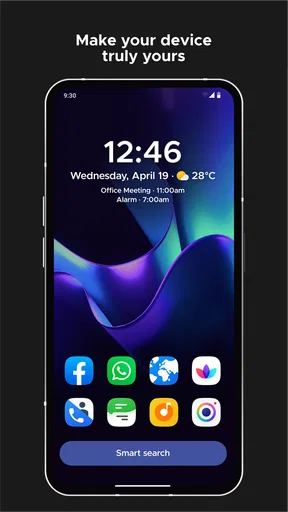
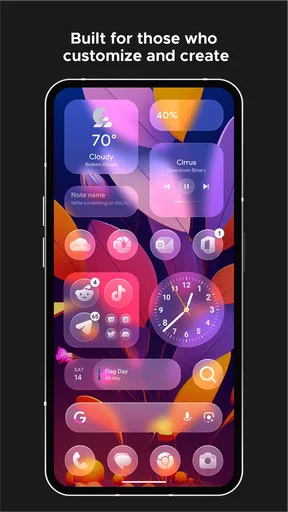
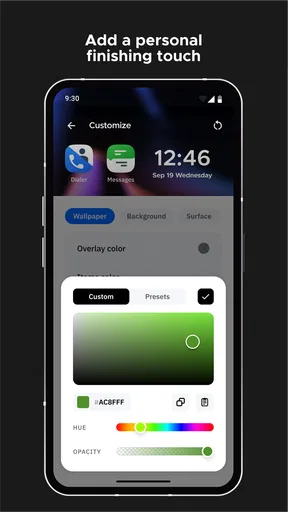
One of the standout features is the impressive array of customization options. You can tweak everything from icon shapes to the layout of your app drawer. It's like giving your phone a fresh coat of paint without the hassle. The app even offers a variety of themes and icon packs to personalize your device further.
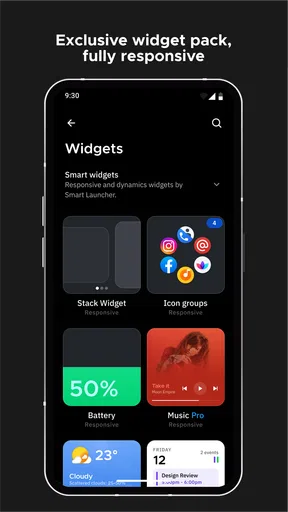
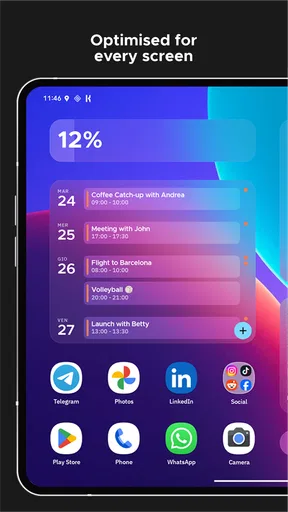
If you’re into widgets, you’ll love this: Smart Launcher 6 allows you to resize them effortlessly. Whether you want a tiny clock widget or a sprawling calendar, you’ve got the freedom to adjust it to your liking.
Efficiency at Its Core
This app isn’t just about looking good; it’s about making your device work better for you. The smart search bar is a game-changer. It's like having a personal Google at your fingertips, letting you quickly find apps, contacts, or even web content. No more endless scrolling through app drawers.
Worth Reading Before You Choose

Baby Panda World Brings Quick Play to Modern Phones, but Its Game Library Feels Busy

ESPN’s Live Game View Makes Following Close Games Easier

QuizzLand Review: A Good Fit for Short Trivia Breaks, Not Every Player

Basketball Stars: Multiplayer Is Fast, but Can It Recover When Matches Go Wrong?

WEBTOON Turns Phone Updates Into a Better Reading Routine

Link to Windows Runs on Shared Habits, Not Social Feeds
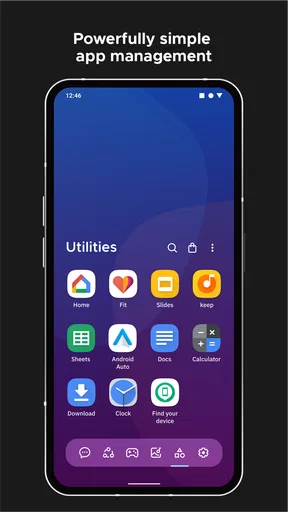
The app also categorizes your apps automatically. It’s like having a neat freak friend who organizes your closet when you’re not looking. You’ll find your social media apps, games, and productivity tools grouped together, saving you time and frustration.
Make the home screen fit a real day
Here is where the launcher’s organization can become more than a tidy drawer. Imagine checking a calendar in the morning, opening a work chat during the day, then looking for a travel app on the way home. If I give the first screen only the shortcuts I use most and let the drawer’s categories handle the less frequent ones, I spend less time deciding where an app might be. Resizing a calendar widget to show enough information without pushing essential shortcuts out of reach is a practical compromise, not just a cosmetic tweak.
Automatic categories save effort, but they are best treated as a starting point rather than a rulebook. If an app lands somewhere that does not match how I think about it, I can search for it instead of retraining my habits around the drawer. That distinction matters: a launcher should adapt to how I use my phone, and a neat-looking category system is not helpful if it adds another step to a familiar task.
Search, categories, and the handoff to other apps
Search is particularly useful when I remember what I want to do but not where I placed the shortcut. It provides a direct route from the home screen to an app, contact, or web content, while categories offer a browsing route when I only remember the general type of app. I would use the two differently: search for a specific destination, and the drawer when I am choosing among several options. Neither replaces the app itself; once I select a result, the task still moves into the relevant app, so the launcher’s contribution is reducing the hunt before that handoff.
There is a small trade-off in relying on a search bar. It is quick when I know what to type, but it is not necessarily better than a visible shortcut for something I open dozens of times a day. I would reserve the home screen for those repeat actions and use search to reach the long tail. This keeps the layout from filling up with shortcuts while avoiding the extra step of searching for every routine task.
A Boost for Performance
Now, let’s talk performance. One of my biggest pet peeves with some launchers is the dreaded lag. But with Smart Launcher 6, everything is buttery smooth. Transitions are quick, and I didn’t experience any slowdowns, even on my older device. Kudos to the developers for optimizing the app so well.
Battery life is another area where this launcher shines. It’s designed to be lightweight, ensuring your battery isn’t drained by unnecessary processes. So, you can enjoy a longer-lasting phone without having to sacrifice on features.
How it compares with a default launcher
A phone’s built-in launcher is usually the simpler choice: it is already there, and people who are happy with its layout may have no reason to change. Smart Launcher is more appealing when the standard home screen leaves you manually hunting through a crowded grid or when you want the drawer, icons, and widgets to feel like one considered setup. Compared with a launcher focused mainly on visual effects, its draw for me is the combination of organization and customization. The trade-off is that another launcher means learning a different arrangement, and the more I personalize it, the more time I may spend maintaining that arrangement.
I would not switch just to chase a vague promise of a faster phone. A launcher changes the interface and the route to apps; it cannot make every app itself faster. If the default launcher already gives me a layout I understand and use comfortably, staying with it is a sensible choice. If I keep losing time to clutter, the ability to shape the home screen and browse app categories gives me a concrete reason to try this one.
Privacy and Security
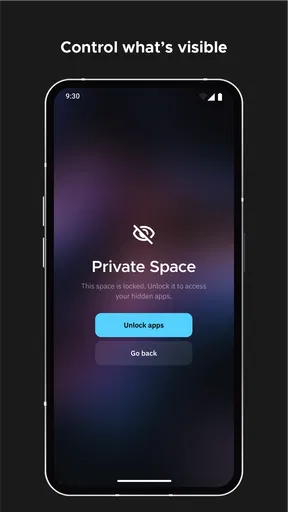
Privacy is a big deal these days, and Smart Launcher 6 takes it seriously. The app offers options to hide apps and protect them with a password. Whether you want to keep certain apps out of sight or secure them from prying eyes, you're covered.
The app doesn't bombard you with ads, which is a refreshing change. You can focus on what matters without being interrupted by annoying pop-ups.
What to consider before settling in
Hiding an app can make a private or rarely used shortcut less visible, but it also means I need to remember how to get back to it. I would use that option selectively, not as a way to conceal every app I do not want on the first screen. A password-protection option is useful for an extra layer around access through the launcher, but I would not treat it as a substitute for the phone’s broader security settings. The practical test is whether the added privacy is worth the extra step when I need the app.
Customization also has a cost in attention. Icon packs and themes can make the interface feel cohesive, yet mixing styles or changing them frequently can make familiar icons harder to spot. I get the best result by choosing a look I can recognize quickly, then leaving it alone unless my needs change. The aim is not to make every screen a project; it is to make the phone easier to navigate.
Who will get the most from it
I would recommend giving it a try if you enjoy tailoring your phone, have accumulated more apps than you can comfortably browse, or want widgets and shortcuts to serve a specific routine. It is especially suited to someone willing to spend a little time arranging the interface, then use search and categories to keep the rest manageable. A student could keep a calendar and study tools close at hand; someone juggling personal and work apps could make the everyday route to each less cluttered. Those are benefits of a flexible home screen, not a promise that the launcher will organize every habit for you automatically.
On the other hand, I would skip it if I prefer the exact consistency of my phone’s default interface, dislike changing familiar controls, or rarely use widgets and customization. It may also be a poor fit if I want every app permanently visible on a single screen; the point of its organized drawer is to make browsing and searching part of the flow. People who enjoy experimenting with layouts may see that as freedom, while minimalists who want no setup at all may find the default launcher more comfortable.
Cost, compatibility, and a sensible trial
Smart Launcher 6 is free to install, with optional in-app purchases ranging from about fifty cents to just under twenty-eight dollars per item. I would begin with the free experience and decide whether any paid option solves a real need before spending money. That keeps the decision grounded in the way I actually use the launcher rather than the temptation to customize for its own sake. It is rated for Everyone, and it runs on Android 7.0 or later, which makes checking the phone’s Android version a useful first step before trying it.
The current release is version 6.6 build 002 patch 1. The app has been available since July 11, 2012, and its broad adoption is reflected in an average rating of 4.6 from around 661,000 ratings, with more than 10 million installs. Those figures suggest plenty of people have tried it, but they do not tell me whether its organization suits my habits; a short personal trial is still the best test. I would set up only the essentials first, then see whether finding and opening common apps feels more natural after a few ordinary days.
Final Thoughts
Overall, Smart Launcher 6 ‧ Home Screen is a fantastic choice for anyone looking to revamp their phone's interface. It’s intuitive, highly customizable, and boosts your phone’s performance. Whether you’re a tech enthusiast or someone who just wants a more organized home screen, this app is worth a shot.
Give it a try, and you might just find yourself wondering how you ever lived without it.
Pros
- Intuitive and user-friendly interface.
- Highly customizable home screen layouts.
- Efficient use of battery and resources.
- Quick access to frequently used apps.
- Smooth and responsive performance.
Cons
- Limited free version features.
- Some features require in-app purchases.
- May not support all widgets.
- Occasional lag on older devices.
- Ads can be intrusive in free version.
FAQs for Smart Launcher 6 ‧ Home Screen
What features does Smart Launcher 6 offer to customize my home screen?
Smart Launcher 6 provides extensive customization options, including adaptive icons, customizable widgets, and various themes. The app's user-friendly interface allows you to easily organize apps into categories and offers a smart search feature. It also supports gestures to enhance user experience, making navigation quick and intuitive.
Is Smart Launcher 6 compatible with all Android devices?
Smart Launcher 6 is compatible with most Android devices running version 5.0 or higher. However, some features may require specific hardware capabilities, such as certain gesture controls. It’s advisable to check your device’s specifications to ensure full compatibility with the app’s features.
Does Smart Launcher 6 drain the battery or slow down my device?
Smart Launcher 6 is designed to be lightweight and efficient, focusing on optimizing performance without draining your battery. It uses minimal resources, ensuring your device runs smoothly. However, like any app, extensive use of widgets and animations may have a slight impact on battery life.
Can I use Smart Launcher 6 for free, or is there a premium version?
Smart Launcher 6 offers a free version with basic features, suitable for most users. However, a premium version is available, providing additional features such as advanced customization options, exclusive themes, and ad-free experience. Users can choose based on their needs and preferences.
How secure is Smart Launcher 6 in terms of user privacy?
Smart Launcher 6 prioritizes user privacy by not collecting unnecessary data. It requires minimal permissions to function effectively, and any data collected is used solely to improve user experience. Users can review privacy settings within the app to ensure they are comfortable with the data usage.


